MEET PRO EDITOR 3.0
Generate stunning images and videos directly from your prompts. With support for all Midjourney models and 27 in-app AI generation models, you can now bring your creative vision to life without leaving the editor.
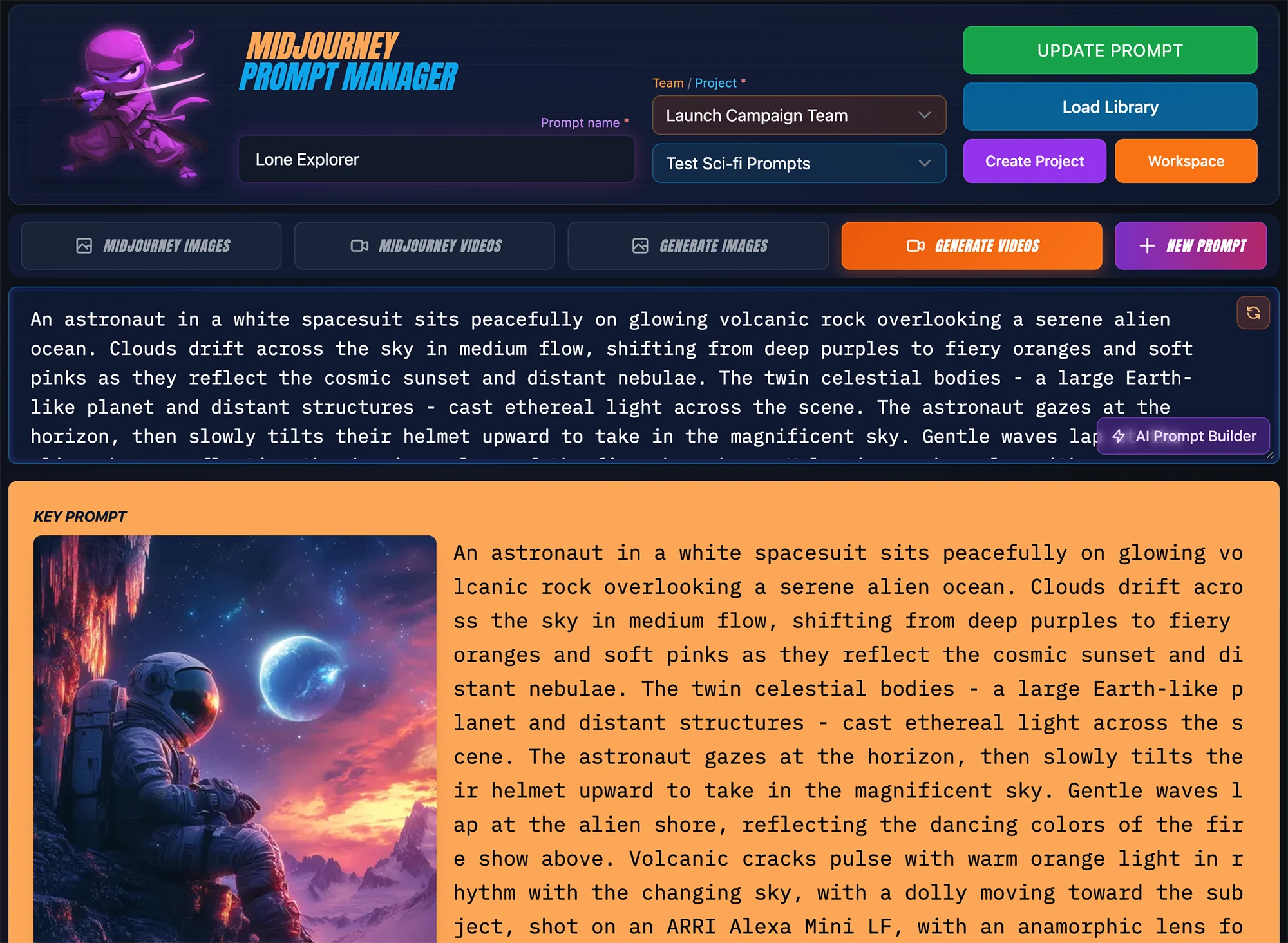
Pro Editor 3.0 and AI Gen Credit System
Pro Editor 3.0 builds on Free Editor 2.0 with base prompt, model parameter controls, and full style & reference image control. Use the AI Prompt Builder to create a detailed prompt, tweak the settings in the editor, then either copy to Midjourney or generate images & video in the editor using any of the 27 AI Gen models.
New to MPM Editors? Take the Editor 2.0 Tour!
2 Midjourney Modes and 2 AI Gen Model Modes
Pro Editor 3.0 offers four distinct modes for different workflows. Switch between modes using the mode selector at the top of the editor.
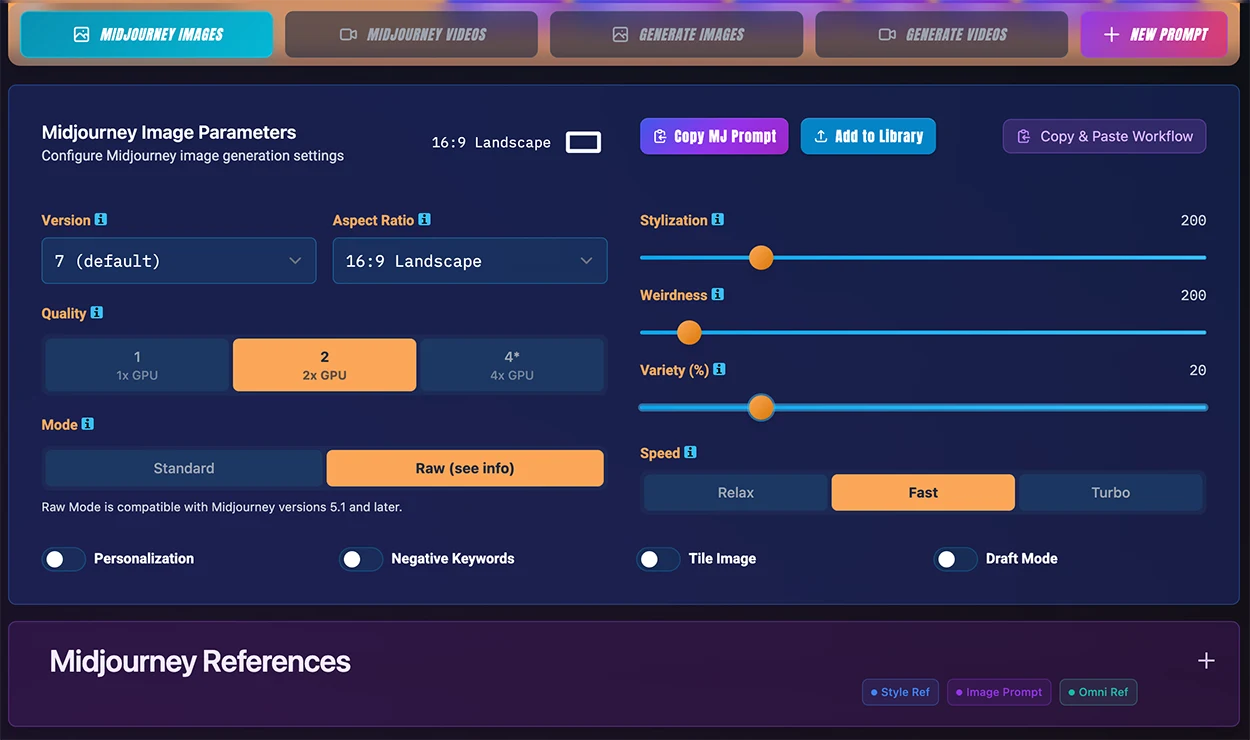
Midjourney Images
Build complete Midjourney image prompts with all parameters, then copy to Discord or the Midjourney web UI. This mode includes all traditional Midjourney parameters like aspect ratio, stylization, chaos, quality, and version selection. Pro Editor supports v7, v6.1, v6, Niji 7, and Niji 6.
- Style, Character & Omni References - Gain control of all MJ reference types: cref, iref, sref, char refs and omni refs
- Image Weights - Use the Pro Editor to dial in specific strengths for reference images
- One-Click Copy - Copy full prompts with reference images to Midjourney's Web UI or Discord (with /imagine prefix option)
Midjourney Videos
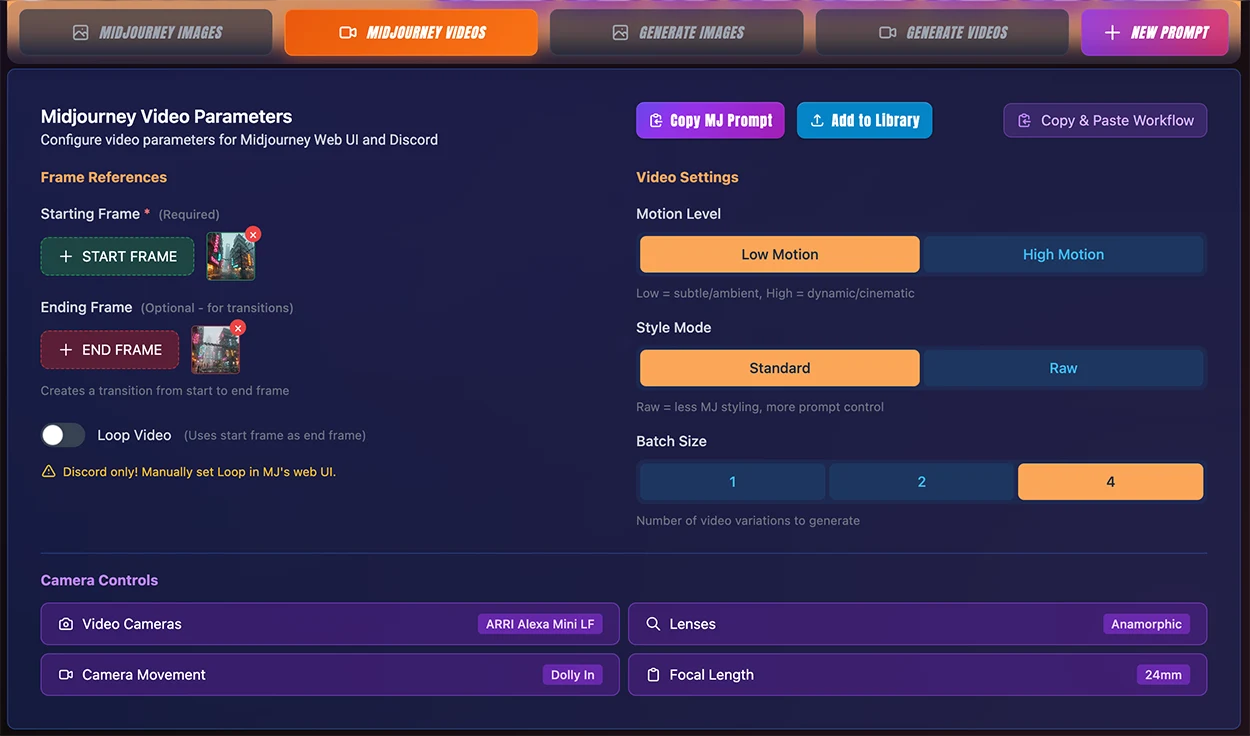
Build Midjourney video prompts with professional cinematography controls. Set camera movements (pan, tilt, zoom, dolly, crane), motion levels, and start/end frame references. The prompt is formatted with the --video parameter ready for Discord or Web UI to jump quickly to video generation mode.
- Cinematography Controls - Professional camera movements and lens types
- Start & End Frames - Set reference images for first and last frames
- Motion Control - Set low or high motion intensity for subtle movements or dynamic action
AI Generation Images
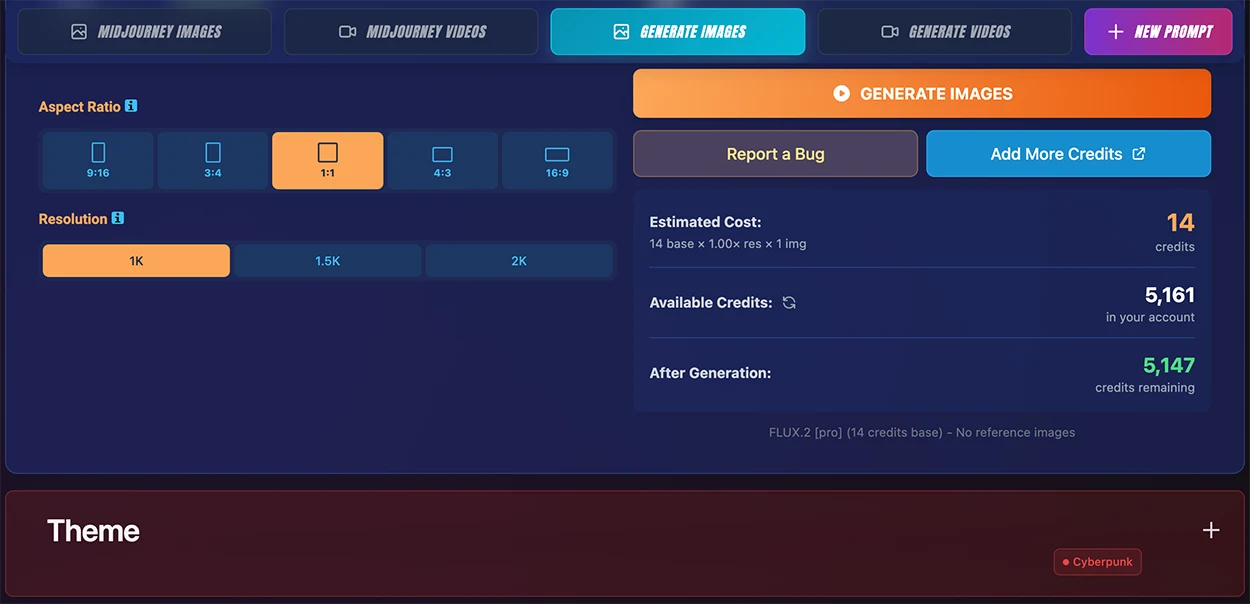
AI CREDITSGenerate images directly in MPM using 12 different AI models. Each model has unique strengths - from photorealistic rendering to stylized illustrations. Generated images can be immediately saved to your Image Library or downloaded, and can be used as references for future prompts.
- 12 AI Models - Nano Banana Pro, Nano Banana 2, Grok Imagine, Kling Image 3.0, GPT Image 1.5, Recraft V3, Seedream 5.0 Lite, FLUX.2 Pro, FLUX.2 Flex, FLUX.2 Dev, FLUX Schnell, FLUX.2 Max
- Reference Images - Use your library images as AI generation references
- Resolution Control - Generate up to 4K resolution (model dependent)
AI Generation Videos
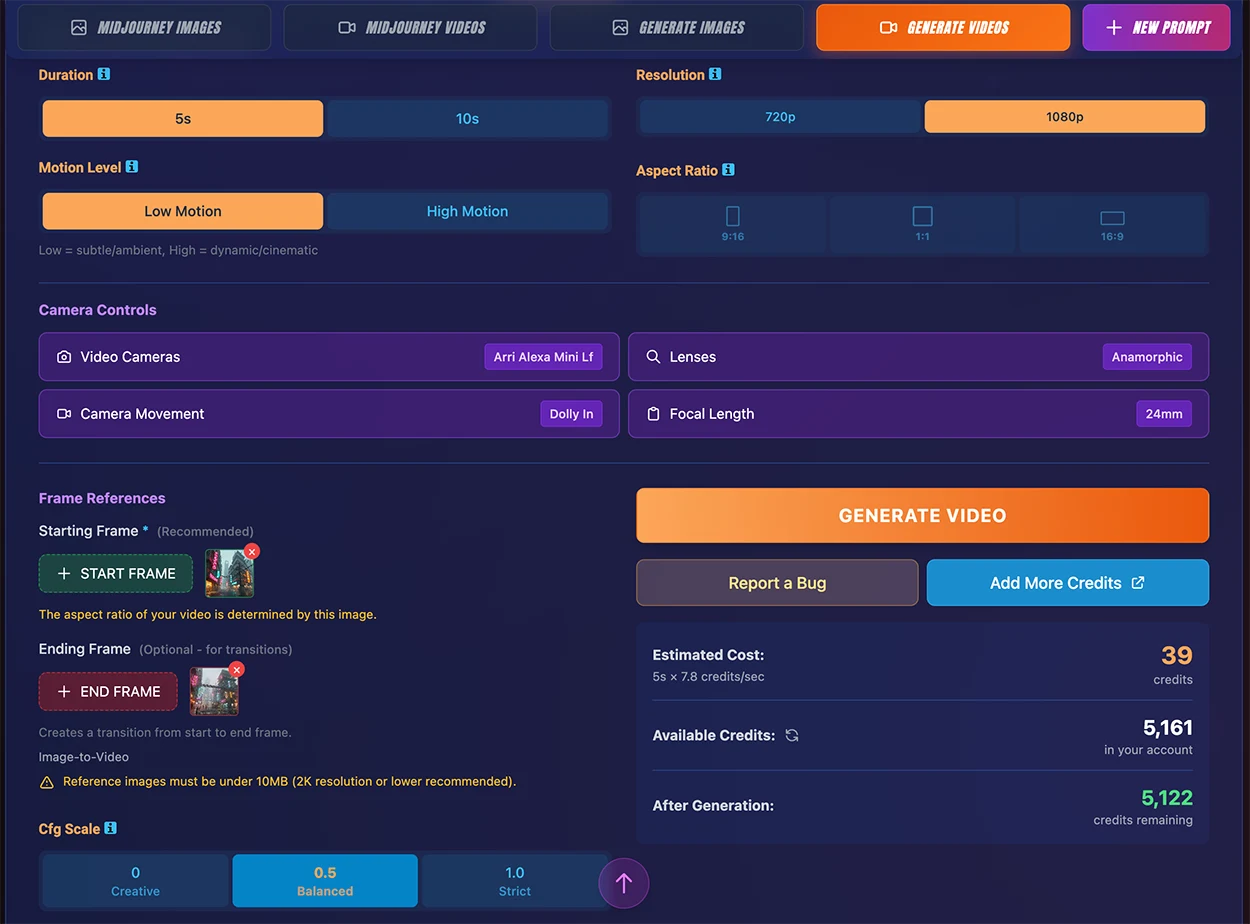
AI CREDITSCreate AI-generated videos with 15 professional video models. Control duration, aspect ratio, and resolution. Use start and end frame images to guide the video content, and add character references to maintain consistency. Generated videos can immediately be saved to your Video Library.
- 15 AI Models - Kling 3.0, Kling 2.6, Kling O1, Kling 2.5 Turbo, Kling 2.1 Master, Grok Imagine, Veo 3.1, Veo 3.1 Fast, Hailuo 02, Hailuo 2.3 Fast, Hunyuan Video, Sora 2, Luma Ray 2, Mochi 1, Wan 2.6
- Start & End Frames - Guide video content with reference images
- Character References / Elements - Kling 01 supports @Elements references which can be controlled precisely using the AI Prompt Builder
Copy & Paste to External Models
Use the copy buttons to quickly export your prompt to Midjourney, Nano Banana Pro, GPT Image, Kling, Grok, FLUX, Firefly, and more. Perfect for quick one-offs when you just need a prompt with styles and basic parameters.

Midjourney Copy
Full prompt with all parameters and references:
- Base prompt with all MPM styles
- All MJ parameters (--ar, --v, --s, --c, etc.)
- Reference URLs (--sref, --cref, --oref)
- Optional /imagine prefix for Discord
Other Model Copy
Optimized prompt for external AI platforms:
- Base prompt with all MPM styles
- Limited parameters (aspect ratio, quality)
- No image references (add manually in each model's UI)
Note: Other AI models don't accept reference image URLs in prompts. Upload your reference images directly in each platform's interface.
Video Mode Copy Buttons
Video mode includes the same copy functionality with camera controls, motion parameters, and cinematography settings included in the prompt. Note you will need to upload any reference images manually to your model's UI like the image copy buttons above.

AI Generation Models
Pro Editor 3.0 integrates with 26 professional AI models for direct image and video generation. Each model offers unique capabilities - from photorealistic rendering to stylized illustrations, and from text-to-video to image-to-video with character consistency.
12 Image Models

14 Video Models

Image Generation Models
 Nano Banana Pro
  Nano Banana 2
  Grok Imagine
  Kling Image 3.0
  GPT Image 1.5
  Recraft V3
  Seedream 5.0 Lite
  FLUX.2 Pro FLUX.2 Flex FLUX.2 Dev FLUX Schnell FLUX.2 Max
 Video Generation Models
 Kling 3.0 Audio/Multi-Shot Kling O1 Char Refs/Elements Kling 2.6 Audio Kling 2.5 Turbo
  Veo 3.1 Audio Veo 3.1 Fast Audio
  Sora 2 Audio
  Luma Ray 2
  Hailuo 02 Hailuo 2.3
  Wan 2.6
  Hunyuan
  Mochi 1 Kling 2.1
  Grok Imagine Audio
 Special Model Features
- ★ Kling O1 Character Refs - Upload character images for consistent identity across video frames
- ★ Kling O1 Elements - Add object/element references to guide generation
- ★ Nano Banana Pro - Supports up to 14 reference images for precise control
- ★ GPT Image 1.5 - OpenAI's latest with 4 reference image support
Audio-Enabled Video Models
- 🔊 Kling 3.0 & 2.6 - Native audio generation with voice control
- 🔊 Grok Imagine - xAI's video model with audio output
- 🔊 Veo 3.1 & Veo 3.1 Fast - Google's models with synced audio
- 🔊 Sora 2 - OpenAI's video model with synced audio output
AI Generation Credits
AI image and video generation uses a credit-based system. Credits are consumed when you generate content, with costs varying by model and output specifications.
How Credits Work
- Credit Balance - Your available credits are displayed at the top of the generation panel. Credits are shared across all AI generation features.
- Cost Estimation - Before generating, you'll see the estimated credit cost based on your selected model and parameters.
- Reserve & Finalize - Credits are reserved when you start a generation and finalized when it completes. Failed generations are automatically refunded.
Image Generation Base
Base credits at 1K resolution. Higher resolutions apply multipliers (1.5K: 1.25×, 2K: 2×, 4K: 8×).
Range: 0.3 – 16.5 credits/image
All 12 image models (base credits at 1K):
- FLUX Schnell (draft)0.3 credits/image
- FLUX.2 Dev1.3 credits/image
- Grok Imagine2.2 credits/image
- Kling Image 3.03.1 credits/image
- FLUX.2 Pro3.3 credits/image
- GPT Image 1.53.7 credits/image
- Seedream 5.0 Lite3.9 credits/image
- Recraft V34.4 credits/image
- FLUX.2 Flex5.5 credits/image
- FLUX.2 Max7.7 credits/image
- Nano Banana 28.8 credits/image
- Nano Banana Pro16.5 credits/image
Tip: Batch 2+ images in Pro Editor to maximize credit efficiency. Single images round up to 1 credit minimum so batch in groups of 4 where possible for draft models such as Schnell. Workspace batch coming soon.
Video Generation Base
Credits based on model and duration (credits × seconds).
Range: 3.5 – 30.8 credits/sec
All 15 video models (base credits/sec):
- Hailuo 2.3 Fast (I2V)3.5 credits/sec
- Mochi 14.4 credits/sec
- Wan 2.64.4 credits/sec
- Hailuo 025.0 credits/sec
- Grok Imagine5.5 credits/sec
- Kling 2.5 Turbo7.7 credits/sec
- Kling 2.67.7 credits/sec
- Hunyuan Video8.8 credits/sec
- Luma Ray 211.0 credits/sec
- Veo 3.1 Fast11.0 credits/sec
- Kling O112.3 credits/sec
- Veo 3.122.0 credits/sec
- Kling 3.024.6 credits/sec
- Sora 226.4 credits/sec
- Kling 2.1 Master30.8 credits/sec
Hailuo Model Notes
Hailuo 2.3 Fast is image-to-video only — a start frame image is required. The output aspect ratio matches your input image. Resolution is fixed at 768p.
Hailuo 02 supports text-to-video and image-to-video. When using a start frame, the aspect ratio is determined by the input image. Resolutions: 512p and 768p.
AI Credits Packages
Credit Package Purchases Never Expire
Ready to Create?
Experience Pro Editor 3.0 and discover the power of integrated AI generation.